Parental Controls for Mobile Network Operators (O2,
EE etc.)
The controls you’ve set up on your child’s device and your home broadband won’t apply if they use 3G or 4G, public WiFi or log on to a friend’s connection instead.
Public WiFi is often available when you’re out and about. But it’s not always secure and can allow children to search the internet free from controls.
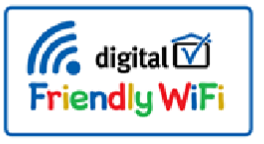
Some venues and businesses offer family-friendly WiFi. When you see the family-friendly WiFisymbol it means that when you connect to the WiFi there are filters in place to stop children from seeing harmful content.
Talk to your child and agree with them what they can and can’t do online. And if they’re visiting friends or family remember that they might not have the same controls set up.
f you’d like more advice give O2 & NSPCC a call - 0808 800 5002.
** If there are any parental controls for another device you would like that are not listed here, please contact school, and we will try and source them for you.
Also in this section –
Quick Links
- Parental Controls for Broadband Providers (SKY, Virgin etc.)
- Parental Controls for Game Consoles & Other Devices (Google HOME, Nintendo etc.)
- Parental Controls for Mobile Network Operators (O2, EE etc.
- Parental Controls for Online Platforms (Netflix, iTunes etc.)
- Parental Controls for Operating Systems (Windows 7, 8 etc.)
- Parental Controls for Search Engines (Google, Bing etc.)
- Parental Controls for Socal Media (Facebook, Insta etc.)
- Parental Controls for Tablets & Smartphones (Android, Apple etc.)