Online Safety

Achieve Believe Expect Enjoy

Parental Controls for Mobile Network Operators (O2,

EE etc.)

The controls you’ve set up on your child’s device and your home broadband won’t apply if they use 3G or 4G, public WiFi or log on to a friend’s connection instead.

Public WiFi is often available when you’re out and about. But it’s not always secure and can allow children to search the internet free from controls.

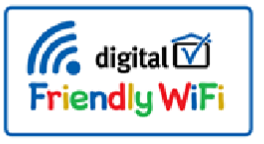
Some venues and businesses offer family-friendly WiFi. When you see the family-friendly WiFisymbol it means that when you connect to the WiFi there are filters in place to stop children from seeing harmful content.

Talk to your child and agree with them what they can and can’t do online. And if they’re visiting friends or family remember that they might not have the same controls set up.

f you’d like more advice give O2 & NSPCC a call - 0808 800 5002.

** If there are any parental controls for another device you would like that are not listed here, please contact school, and we will try and source them for you.

Cookie Notice

We use cookies to improve your experience, provide personalized content, and analyze our traffic. You can choose which cookies to allow. By clicking “Accept All” or by continuing to use our site, you agree to the use of all cookies as described in our Cookie Policy.

Report Bullying Form

If you ever feel unsafe, unhappy or see someone being treated unfairly, please let us know. You can use this form to report bullying – for yourself or for someone else. All reports are treated seriously and confidentially.

A member of staff will review your message as soon as possible. If someone is in danger, please speak to a teacher or adult immediately.